
Table of Contents
Table of Contents
How our clusters work
We expect the HPC clusters users to know what an HPC cluster is and what parallel computing is. As all HPC clusters are different, it is important for any users to have a general understanding of the clusters they are working on, what they offer and what are their limitations.
This section gives an overview of the technical HPC infrastructure and how things work at the University of Geneva. More details can be found in the corresponding sections of this documentation.
The last part of this page gives more details for advanced users.
The clusters : Baobab, Yggdrasil and Bamboo
The University of Geneva owns three HPC clusters or supercomputers : Baobab, Yggdrasil and Bamboo.
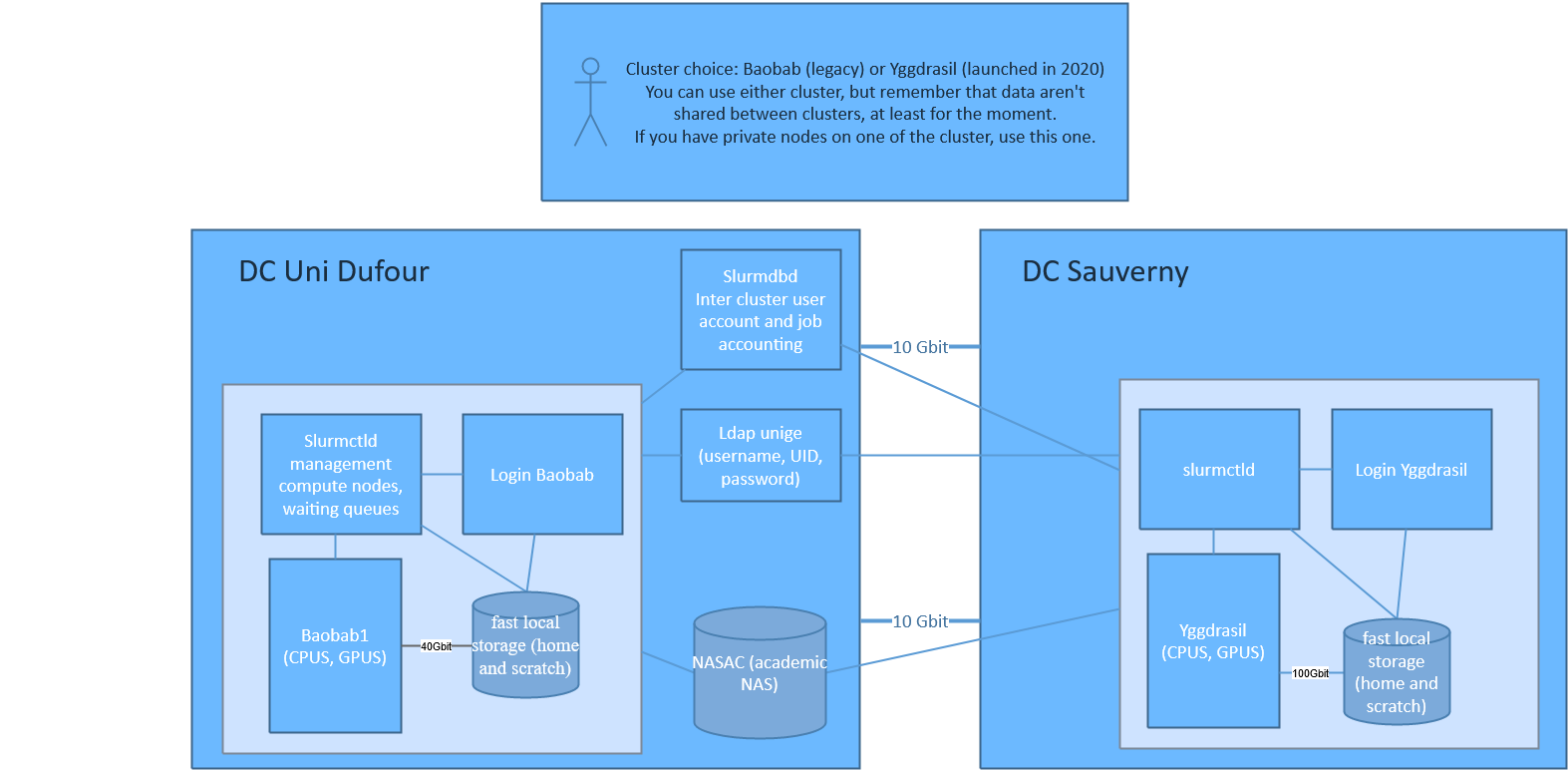
As for now, they are completely separated entities, each of them with their own private network, storage, and login node. What is shared is the accounting (user accounts and job usage).
Choose the right cluster for your work:
- You can use every clusters, but try to stick to one of them.
- Use the cluster where the private partition you have access to is located.
- If you need to access other servers not located in Astro, use Baobab or Bamboo to save bandwidth.
- As your data are stored locally on each cluster, avoid to use both clusters if this involves a lot of data moving between cluster.
You can't submit jobs from one cluster to the other one. This may be done in the future.
Boabab is physically located at Uni Dufour in Geneva downtown, while Yggdrasil is located at the Observatory of Geneva in Sauverny and Bamboo is located in campus Biotech
| cluster name | datacentre | Interconnect | public CPU | public GPU | Total CPU size | Total GPU size |
|---|---|---|---|---|---|---|
| Baobab | Dufour | IB 100GB EDR | ~900 | 0 | ~13'044 | 273 |
| Yggdrasil | Astro | IB 100GB EDR | ~3000 | 44 | ~8'008 | 52 |
| Bamboo | Biotech | IB 100GB EDR | ~5700 | 20 | ~5'700 | 20 |
How do our clusters work ?
Overview
Each cluster is composed of :
- a login node (aka headnode) allowing users to connect and submit jobs to the cluster. Aach user is limited to 2 CPU cores and 8 GB of RAM on the login node.
- many compute nodes which provide the computing power. The compute nodes are not all identical ; they all provide CPU cores (from 8 to 128 cores depending on the model), and some nodes also have GPUs or more RAM (see below).
- management servers that you don't need to worry about, that's the HPC engineers' job. The management servers are here to provide the necessary services such as all the applications (with EasyBuild / module), Slurm job management and queuing system, ways for the HPC engineers to (re-)deploy compute nodes automatically, etc.
- BeeGFS storage servers which provide “fast” parallel file system to store the data from your
$HOMEand for the scratch data ($HOME/scratch).
All those servers (login, compute, management and storage nodes) :
- run with the GNU/Linux distribution Rocky.
- are inter-connected on high speed InfiniBand network
- 40Gbit/s (QDR) for Baobab.
- 100Gbit/s (EDR) for Yggdrasil.
- 100Gbit/s (EDR) for Bamboo.
In order to provide hundreds of software and versions, we use EasyBuild / module. It allows you to load the exact version of a software/library that is compatible with your code. Learn more about EasyBuild/module
When you want to use some cluster's resources, you need to connect to the login node and submit a job
to Slurm which is our job management and queuing system. The job is submitted with an sbatch
script (a Bash/shell script with special instructions for Slurm such as how many CPU you need,
which Slurm partition to use how long your script will run and how to execute your code).
Slurm will place your job in a queue with other users' jobs, and find the fastest way to provide the
resources you asked for. When the resources are available, your job will start.
Learn more about Slurm
One important note about Slurm is the concept of partition. When you submit a job, you have to specify a partition that will give you access to some specific resources. For instance, you can submit a job that will use only CPU or GPU nodes.
Purchase: Hardware Pricing
**CPU and GPU server example pricing **
See below the current price of a compute node (without the extra 15% and without VAT)
AMD CPU
| id | nb cpu | cores per cpu | cpu model | RAM in GB | disk in GB | GB / core | approximate price HT |
|---|---|---|---|---|---|---|---|
| 1 | 1 | 128 | AMD EPYC 9754 2.25GHz | 768 (12×64 / 0 free slots) | 960 | 6 | 30,0k CHF |
| 2 | 1 | 128 | AMD EPYC 9754 2.25GHz | 512 (8×64 / 4 free slots) | 960 | 4 | 22,4k CHF |
| 3 | 2 | 128 | AMD EPYC 9754 2.25GHz | 768 (24×32 / 0 free slots) | 3840 | 3 | 32,9k CHF |
| 4 | 2 | 128 | AMD EPYC 9754 2.25GHz | 512 (16×32 / 8 free slots) | 3840 | 2 | 26,2k CHF |
| 5 | 2 | 128 | AMD EPYC 9754 2.25GHz | 768 (24×32 / 0 free slots) | 960 | 3 | 31,5k CHF |
| 6 | 2 | 128 | AMD EPYC 9754 2.25GHz | 512 (16×32 / 8 free slots) | 960 | 2 | 24,7k CHF |
| 7 | 2 | 128 | AMD EPYC 9754 2.25GHz | 576 (24×24 / 0 free slots) | 960 | 2 | 28,0k CHF |
The big difference in term of cost isn't the number of cores but the Memory and SSD disk.
The bandwidth lowers if you have empty memory slots:
- 12 memory (i.e. no empty slots) = 460.8 GB/s
- 8 memory (i.e. 4 empty slots) = 307 GB/s
Key differences:
- + 9754 has higher memory performance of up to 460.8 GB/s vs 7763 which has 190.73 GB/s
- + 9754 has a bigger cache
- - 9754 is more expensive
- - power consumption is 400W for 9754 vs 240W for 7763
- - 9754 is more difficult to cool as the inlet temperature for air colling must be 22° max
GPU H100 with AMD
- 2 x 64 Core AMD EPYC 9554 3.15GHz Processor
- 768GB DDR4 4800MHz ECC Server Memory (24x 32GB / 0 free slots)
- 1 x 7.68TB NVMe Intel 24×7 Datacenter SSD (14PB written until warranty end)
- 4 x nVidia Ampere H100 94GB PCIe GPU (max. 8 GPUs possible)
- ~ 124k CHF HT
- ~ 28,5k CHF HT per extra GPU
GPU RTX4090 with AMD
- 2 x 64 Core AMD EPYC 9554 3.10GHz Processor
- 384 GB DDR4 4800MHz ECC Server Memory
- 8 x nVidia RTX 4090 24GB Graphics Controller
- ~ 44k CHF HT
We usually install and order the nodes twice per year.
If you want to ask a financial contribution from UNIGE you must complete submit a request to the COINF.
Use Baobab for teaching
Baobab, our HPC infrastructure, supports educators in providing students with hands-on HPC experience.
Teachers can request access via [dw.unige.ch](final link to be added later, use hpc@unige.ch in the meantime), and once the request is fulfilled, a special account named <PI_NAME>_teach will be created for the instructor. Students must specify this account when submitting jobs for course-related work (e.g., --account=<PI_NAME>_teach).
A shared storage space can also be created optionally, accessible at /home/share/<PI_NAME>_teach and/or /srv/beegfs/scratch/shares/<PI_NAME>_teach.
All student usage is free of charge if they submit their job to the correct account.
We strongly recommend that teachers use and promote our user-friendly web portal at OpenOndDemand which supports tools like Matlab, JupyterLab, and more. Baobab helps integrate real-world computational tools into curricula, fostering deeper learning in HPC technologies.
How do I use your clusters ?
Everyone has different needs for their computation. A typical example of usage of the cluster would consists of these steps :
- connect to the login node
- this will give you access to the data from your
$HOMEdirectory - execute an sbatch script which will request resources to Slurm for the estimated runtime (i.e. : 16 CPU cores, 8 GB RAM for up to 7h on partition “shared-cpu”). The sbatch will contain instructions/commands :
- for Slurm scheduler to access compute resources for a certain time
- to load the right application and libraries with
modulefor your code to work - on how to execute your application.
- the Slurm job will be placed in the Slurm queue
- once the requested resources are available, your job will start and be executed on one or multiple compute nodes (which can all access the BeeGFS
$HOMEand$HOME/scratchdirectories). - all communication and data transfer between the nodes, the storage and the login node go through the InfiniBand network.
If you want to know what type of CPU and architecture is supported, check the section For Advanced users.
For advanced users
Infrastructure schema

Compute nodes
Both clusters contain a mix of “public” nodes provided by the University of Geneva, a “private” nodes in general funded 50% by the University through the COINF and 50% by a research group for instance. Any user of the clusters can request compute resources on any node (public and private), but a research group who owns “private” nodes has a higher priority on its “private” nodes and can request a longer execution time.
CPUs models available
Several CPU models are available across the three clusters. The table below summarizes the available resources.
| Model | Generation | Architecture | Cores per Socket | Freq |
|---|---|---|---|---|
| E5-2660V0 | V3 | Sandy Bridge EP | 8 | |
| E5-2643V3 | V5 | Haswell-EP | 6 | 3.4GHz |
| E5-2630V4 | V6 | Broadwell-EP | 10 | 2.2GHz |
| E5-2637V4 | V6 | Broadwell-EP | 4 | 2.2GHz |
| E5-2643V4 | V6 | Broadwell-EP | 6 | 3.4GHz |
| E5-2680V4 | V6 | Broadwell-EP | 14 | 2.4GHz |
| EPYC-7601 | V7 | Naples | 32 | 2.2GHz |
| EPYC-7302P | V8 | Rome | 16 | 3.0GHz |
| EPYC-7742 | V8 | Rome | 64 | 2.25GHz |
| GOLD-6234 | V9 | Cascade Lake | 8 | 3.30GHz |
| GOLD-6240 | V9 | Cascade Lake | 18 | 2.60GHz |
| GOLD-6244 | V9 | Cascade Lake | 8 | 3.60GHz |
| SILVER-4208 | V9 | Cascade Lake | 8 | 2.10GHz |
| SILVER-4210R | V9 | Cascade Lake | 10 | 2.6GHz |
| AMPEREONE-A192-26X | V10 | ARM AmperOne | 192 | 2.6GHz |
| EPYC-72F3 | V10 | Milan | 8 | 3.7GHz |
| EPYC-7763 | V10 | Milan | 64 | 2.45GHz |
| EPYC-9554 | V11 | Genoa | 64 | 3.10GHz |
| EPYC-9654 | V12 | Genoa | 96 | 3.70GHz |
| EPYC-9754 | V13 | Genoa | 128 | 3.70GHz |
GPUs models available
Several GPU models are available across the three clusters. The table below summarizes the available resources.
| Model | Memory | GRES | Constraint gpu arch | Compute Capability | CUDA min → max | Feature | Billing Weight |
|---|---|---|---|---|---|---|---|
| Titan RTX | 24GB | nvidia_titan_rtx | COMPUTE_TYPE_TURING | COMPUTE_CAPABILITY_7_5 | 10.0 → 13.0 | COMPUTE_MODEL_NVIDIA_TITAN_RTX | 1 |
| Titan X | 12GB | nvidia_titan_x | COMPUTE_TYPE_PASCAL | COMPUTE_CAPABILITY_6_1 | 8.0 → 12.9 | COMPUTE_MODEL_NVIDIA_TITAN_X | 1 |
| P100 | 12GB | tesla_p100-pcie-12gb | COMPUTE_TYPE_PASCAL | COMPUTE_CAPABILITY_6_0 | 8.0 → 12.9 | COMPUTE_MODEL_TESLA_P100_PCIE_12GB | 1 |
| RTX 2080 Ti | 11GB | nvidia_geforce_rtx_2080_ti | COMPUTE_TYPE_TURING | COMPUTE_CAPABILITY_7_5 | 10.0 → 13.0 | COMPUTE_MODEL_NVIDIA_GEFORCE_RTX_2080_TI | 2 |
| RTX 3080 | 10GB | nvidia_geforce_rtx_3080 | COMPUTE_TYPE_AMPERE | COMPUTE_CAPABILITY_8_6 | 11.0 → 13.0 | COMPUTE_MODEL_NVIDIA_GEFORCE_RTX_3080 | 3 |
| V100 | 32GB | tesla_v100-pcie-32gb | COMPUTE_TYPE_VOLTA | COMPUTE_CAPABILITY_7_0 | 9.0 → 12.9 | COMPUTE_MODEL_TESLA_V100_PCIE_32GB | 3 |
| A100 40GB | 40GB | nvidia_a100-pcie-40gb | COMPUTE_TYPE_AMPERE | COMPUTE_CAPABILITY_8_0 | 11.0 → 13.0 | COMPUTE_MODEL_NVIDIA_A100_PCIE_40GB | 5 |
| RTX 3090 | 24GB | nvidia_geforce_rtx_3090 | COMPUTE_TYPE_AMPERE | COMPUTE_CAPABILITY_8_6 | 11.0 → 13.0 | COMPUTE_MODEL_NVIDIA_GEFORCE_RTX_3090 | 5 |
| RTX A5000 | 25GB | nvidia_rtx_a5000 | COMPUTE_TYPE_AMPERE | COMPUTE_CAPABILITY_8_6 | 11.0 → 13.0 | COMPUTE_MODEL_NVIDIA_RTX_A5000 | 5 |
| RTX A5500 | 24GB | nvidia_rtx_a5500 | COMPUTE_TYPE_AMPERE | COMPUTE_CAPABILITY_8_6 | 11.0 → 13.0 | COMPUTE_MODEL_NVIDIA_RTX_A5500 | 5 |
| A100 80GB | 80GB | nvidia_a100_80gb_pcie | COMPUTE_TYPE_AMPERE | COMPUTE_CAPABILITY_8_0 | 11.0 → 13.0 | COMPUTE_MODEL_NVIDIA_A100_80GB_PCIE | 8 |
| RTX 4090 | 24GB | nvidia_geforce_rtx_4090 | COMPUTE_TYPE_ADA | COMPUTE_CAPABILITY_8_9 | 11.8 → 13.0 | COMPUTE_MODEL_NVIDIA_GEFORCE_RTX_4090 | 8 |
| RTX A6000 | 48GB | nvidia_rtx_a6000 | COMPUTE_TYPE_AMPERE | COMPUTE_CAPABILITY_8_6 | 11.0 → 13.0 | COMPUTE_MODEL_NVIDIA_RTX_A6000 | 8 |
| RTX 5000 | 32GB | nvidia_rtx_5000 | COMPUTE_TYPE_ADA | COMPUTE_CAPABILITY_8_9 | 11.8 → 13.0 | COMPUTE_MODEL_NVIDIA_RTX_5000 | 9 |
| RTX 5090 | 32GB | nvidia_geforce_rtx_5090 | COMPUTE_TYPE_BLACKWELL | COMPUTE_CAPABILITY_12_0 | 12.8 → 13.0 | COMPUTE_MODEL_NVIDIA_GEFORCE_RTX_5090 | 10 |
| RTX PRO 4500 | 32GB | nvidia_rtx_pro_4500_blackwell | COMPUTE_TYPE_BLACKWELL | COMPUTE_CAPABILITY_12_0 | 12.8 → 13.0 | COMPUTE_MODEL_NVIDIA_RTX_PRO_4500_BLACKWELL | 10 |
| H100 | 94GB | nvidia_h100_nvl | COMPUTE_TYPE_HOPPER | COMPUTE_CAPABILITY_9_0 | 11.8 → 13.0 | COMPUTE_MODEL_NVIDIA_H100_NVL | 14 |
| RTX Pro 6000 | 96GB | nvidia_rtx_pro_6000_blackwell | COMPUTE_TYPE_BLACKWELL | COMPUTE_CAPABILITY_9_0 | 12.8 → 13.0 | COMPUTE_MODEL_NVIDIA_RTX_PRO_6000_BLACKWELL | 16 |
| H200 | 141GB | nvidia_h200_nvl | COMPUTE_TYPE_HOPPER | COMPUTE_CAPABILITY_9_0 | 11.8 → 13.0 | COMPUTE_MODEL_NVIDIA_H200_NVL | 17 |
See here how to request GPU for your jobs.
Bamboo
CPU MODELS — bamboo
GPUs on Bamboo
Baobab
Since our clusters are regularly expanded, the nodes are not all from the same generation. You can see the details in the following table.
CPU MODELS — baobab
| Model | Generation | Architecture | Freq | Nb core | Memory | Nodeset |
|---|---|---|---|---|---|---|
| E5-2630V4 | V6 | Broadwell-EP | 2.2GHz | 20 | 86GB | cpu199 |
| E5-2630V4 | V6 | Broadwell-EP | 2.2GHz | 20 | 94GB | cpu[193-198,200-201,205-213,220-229,237-244,247-264] |
| E5-2630V4 | V6 | Broadwell-EP | 2.2GHz | 20 | 224GB | cpu246 |
| E5-2630V4 | V6 | Broadwell-EP | 2.2GHz | 20 | 251GB | cpu245 |
| E5-2637V4 | V6 | Broadwell-EP | 2.2GHz | 8 | 503GB | cpu[218-219] |
| E5-2643V4 | V6 | Broadwell-EP | 3.4GHz | 12 | 62GB | cpu[202,216-217] |
| E5-2660V0 | V3 | Sandy Bridge EP | 16 | 62GB | cpu001 | |
| E5-2680V4 | V6 | Broadwell-EP | 2.4GHz | 28 | 503GB | cpu203 |
| EPYC-7742 | V8 | Rome | 2.25GHz | 128 | 503GB | cpu[273-277,285-307,314-335] |
| EPYC-7742 | V8 | Rome | 2.25GHz | 128 | 1007GB | cpu[312-313] |
| EPYC-9654 | V12 | Genoa | 3.70GHz | 192 | 768GB | cpu[350,352] |
| GOLD-6240 | V9 | Cascade Lake | 2.60GHz | 36 | 187GB | cpu[084-090,265-272,278-284,308-311,336-349] |
| GOLD-6244 | V9 | Cascade Lake | 3.60GHz | 16 | 754GB | cpu351 |
(baobab)-[root@admin1 slurm] (master *)$
The “generation” column is just a way to classify the nodes on our clusters. In the following table you can see the features of each architecture.
| MMX | SSE | SSE2 | SSE3 | SSSE3 | SSE4.1 | SSE4.2 | AVX | F16C | AVX2 | FMA3 | NB AVX-512 FMA | |
|---|---|---|---|---|---|---|---|---|---|---|---|---|
| Westmere-EP | YES | YES | YES | YES | YES | YES | YES | NO | NO | NO | NO | |
| Sandy Bridge-EP | YES | YES | YES | YES | YES | YES | YES | YES | NO | NO | NO | |
| Ivy Bridge-EP | YES | YES | YES | YES | YES | YES | YES | YES | YES | NO | NO | |
| Haswell-EP | YES | YES | YES | YES | YES | YES | YES | YES | YES | YES | NO | |
| Broadwell-EP | YES | YES | YES | YES | YES | YES | YES | YES | YES | YES | YES | |
| Naples | YES | YES | YES | YES | YES | YES | YES | YES | YES | YES | YES | |
| Rome | YES | YES | YES | YES | YES | YES | YES | YES | YES | YES | YES | |
| Milan | YES | YES | YES | YES | YES | YES | YES | YES | YES | YES | YES | |
| Genoa | YES | YES | YES | YES | YES | YES | YES | YES | YES | YES | YES | |
| Cascade Lake | YES | YES | YES | YES | YES | YES | YES | YES | YES | YES | YES | 2 |
GPUs on Baobab
In the following table you can see which type of GPU is available on Baobab.
| Model | Memory per GPU | Nodeset |
|---|---|---|
| A100 40GB | 40GB | gpu[020,022,027-028,030-031] |
| A100 80GB | 80GB | gpu[027,029,032-033,045] |
| RTX 2080 Ti | 11GB | gpu[011,013-016,018-019] |
| RTX 3080 | 10GB | gpu[023-024,036-043] |
| RTX 3090 | 24GB | gpu[017,021,025-026,034-035] |
| RTX 4090 | 24GB | gpu049 |
| RTX 5000 | 32GB | gpu050 |
| RTX A5000 | 25GB | gpu[044,047] |
| RTX A5500 | 24GB | gpu046 |
| RTX A6000 | 48GB | gpu048 |
| Titan X | 12GB | gpu[002,008-010] |
| P100 | 12GB | gpu[004-007] |
Link to see the GPU details https://developer.nvidia.com/cuda-gpus#compute
Yggdrasil
CPU MODELS — yggdrasil
Since our clusters are regularly expanded, the nodes are not all from the same generation. You can see the details in the following table.
| Model | Generation | Architecture | Freq | Nb core | Memory | Nodeset |
|---|---|---|---|---|---|---|
| EPYC-7742 | V8 | Rome | 2.25GHz | 128 | 503GB | cpu[123-124,135-150] |
| EPYC-7742 | V8 | Rome | 2.25GHz | 128 | 1007GB | cpu[125-134] |
| GOLD-6240 | V9 | Cascade Lake | 2.60GHz | 36 | 184GB | cpu001 |
| GOLD-6240 | V9 | Cascade Lake | 2.60GHz | 36 | 187GB | cpu[002-057,059-082,091-097] |
| GOLD-6240 | V9 | Cascade Lake | 2.60GHz | 36 | 204GB | cpu058 |
| GOLD-6240 | V9 | Cascade Lake | 2.60GHz | 36 | 1510GB | cpu[120-122] |
| GOLD-6244 | V9 | Cascade Lake | 3.60GHz | 16 | 754GB | cpu[113-115] |
| EPYC-7763 | V10 | Milan | 2.45GHz | 128 | 503GB | cpu[151-158] |
| EPYC-9654 | V12 | Genoa | 3.70GHz | 192 | 773GB | cpu[159-164] |
The “generation” column is just a way to classify the nodes on our clusters. In the following table you can see the features of each architecture.
| SSE4.2 | AVX | AVX2 | NB AVX-512 FMA | |
|---|---|---|---|---|
| Intel Xeon Gold 6244 | YES | YES | YES | 2 |
| Intel Xeon Gold 6240 | YES | YES | YES | 2 |
| Intel Xeon Gold 6234 | YES | YES | YES | 2 |
| Intel Xeon Silver 4208 | YES | YES | YES | 1 |
Click here to Compare Intel CPUS.
GPUs on Yggdrasil
In the following table you can see which type of GPU is available on Yggdrasil.
Link to see the GPU details https://developer.nvidia.com/cuda-gpus#compute
Monitoring performance
In order to follow system ressources, you can go to https://monitor.hpc.unige.ch/dashboards
You can reach node metrics for the last 30 days and BeeGFS metrics for the last 6 months.
For checking resources on a specific node, go to “Baobab - General” or “Yggdrasil - General” and click on “Host Overview - Single”. You will be able to choose the node you want to check in the form at the top :

For going back to the dashboard list, click on the four squares on the left panel :

The “General” dashboard in “Yggdrasil - General” and “Baobab - General” folders gives an overview of the cluster : total load and memory used, and how many nodes are up/down.
You can see GPU metrics too under “Cuda - GPU” dashboards.